
Sending good email campaigns is only half the job. The other half is understanding what happens after you hit send — who opened it, who clicked, who converted, and who left your list (and why).
Email marketing metrics are what bridge the gap between “we sent a campaign” and “here’s the impact it made on our business goals.”
In this guide, you’ll learn about the key metrics, how to interpret them, and how to use that data to improve your email strategy over time.
- What Are Email Marketing Metrics — and Why Do They Matter?
- How to Measure Email Marketing Success
- Key Email Marketing Metrics to Track
- Email Marketing Benchmarks: What’s a Good Result?
- How to Track and Analyze Your Campaign Performance
- Email Marketing Reports: What to Include
- What to Look for in Email Analytics Tools
- How Cyberimpact Handles Tracking and Analytics
- Common Mistakes When Tracking Email Metrics
- Conclusion
What Are Email Marketing Metrics — and Why Do They Matter?
Email marketing metrics are the data points that tell you how your newsletter and email campaigns are performing. They cover everything from how many people opened your email to how many clicked a link, completed a purchase, or unsubscribed.
You’ll sometimes hear the terms metrics and KPIs used interchangeably, but they’re slightly different things: metrics are raw measurements — open rate, click rate, bounce rate. KPIs (Key Performance Indicators) are the specific metrics you’ve decided to track against a goal.
Your click rate is always a metric; it becomes a KPI when you set a target for it and use it to measure success — for example, if you want to increase website visits coming from your newsletter.
Metrics connect directly to the impact of email marketing on your organization, and they can be organized into categories:
- Engagement metrics (opens, clicks) tell you whether your content is resonating with the audience
- Conversion metrics tell you whether your emails are driving action (website visits, purchases, etc.)
- List health metrics (bounces, unsubscribes, spam complaints) tell you whether your sending is sustainable and whether your sender reputation is in good shape
Every campaign teaches you something you can use to do better next time, so tracking your email stats is essential for a healthy email strategy.
How to Measure Email Marketing Success
Before looking at any numbers, it helps to be clear on what you’re trying to achieve. Email marketing serves different goals depending on the organization and the campaign:
- A nonprofit might focus on click-through rate and event registrations
- A B2B company might track lead quality and meeting bookings
- A membership organization might watch retention and re-engagement rates
Once you know your goal, you can identify which metrics you need to focus on — and which ones are just noise.
Stay away from vanity metrics, like list size and open rate. It looks good on a report to have a huge list and a high open rate, but think carefully: would you rather have an email with a 50% open rate and zero clicks, or an email with a 25% open rate and a 12% click rate?
Not all metrics matter equally. You can track all of them if you’d like, but we recommend prioritizing the numbers that will tell you whether you hit your actual goal or not.
Key Email Marketing Metrics to Track
Open Rate
What it is: The percentage of delivered emails that were opened.
Formula: (Unique opens ÷ Emails delivered) × 100
Why it matters: Open rate gives you a signal on whether your subject line is effective and the status of your sender reputation. If people recognize your name and trust it, they’re more likely to open the email. If your subject line catches their attention, they open. It’s an early-stage engagement indicator.
Important note on open rates: Since Apple’s Mail Privacy Protection launched, open rates have been inflated for a segment of users on Apple devices — their emails are pre-loaded, which registers as an “open” even if the person never actually read it. The same has happened with Outlook Mail and Yahoo Mail, so treat open rate as a signal, not an exact science.
How to improve your open rate: Test subject lines (length, tone, personalization, curiosity vs. clarity) and send at times when your audience is likely to be checking email.
Click-Through Rate (CTR)
What it is: The percentage of delivered emails where at least one link was clicked.
Formula: (Unique clicks ÷ Emails delivered) × 100
Why it matters: CTR measures the overall action rate of your entire list — in other words, how many people in your list took action after receiving the email.
How to improve it: Make your call-to-action clear and specific. Ensure the content leading up to the CTA builds interest and makes clicking feel like the natural next step. And never forget that one strong CTA is better than five competing ones in the same message.
Click-to-Open Rate (CTOR)
What it is: The percentage of people who opened your email and then clicked a link.
Formula: (Unique clicks ÷ Unique opens) × 100
The difference between CTR and CTOR: While CTR tells you the engagement rate of your entire list (all emails delivered), CTOR focuses on the engagement of those who actually opened your email. It also isolates the quality of your email content and CTAs from the quality of your subject line. Your subject line gets the open; what’s inside gets the click.
How to improve it: Align the email content with the expectation set by the subject line, and make the body copy relevant and the CTA easy to act on.
Conversion Rate
What it is: The percentage of email recipients who completed the desired action — a purchase, a form fill, a registration, a booking.
Formula: (Conversions ÷ Emails delivered) × 100
Why it matters: Conversion rate is the key metric that connects email performance to actual business results. It’s the “so what” behind every other number. You can have strong open rates and click rates, but if those clicks aren’t converting outside of the email, something in the post-click experience (landing page, offer, friction) needs attention.
How to improve it: Before hitting send, target the offer to the people who’d actually want to receive it — not your entire list. Segmentation has been a key factor in improving email conversion rates. Then make sure your landing page matches the email offer exactly.
Bounce Rate
What it is: The percentage of emails that couldn’t be delivered.
Formula: (Bounced emails ÷ Emails sent) × 100
There are two types of bounces:
- Hard bounces: Permanent delivery failures due to an invalid address, non-existent domain, and so on. These should be removed from your list immediately. If you’re using Cyberimpact to send emails, they are removed automatically for you.
- Soft bounces: Temporary failures due to a full inbox or server issue. These can be retried, but persistent soft bounces should eventually be cleaned.
Why it matters: A high bounce rate damages your sender reputation with inbox providers, and this can affect deliverability for your entire list. Keeping a healthy email list is essential for long-term results and the longevity of your email marketing strategy.
How to improve it: Use a double opt-in process to ensure addresses are valid from the start. We also recommend doing a regular list cleaning by removing contacts who haven’t engaged in the past 12 months, or having a re-engagement strategy in place to try to get them to reconnect with your content.
Unsubscribe Rate
What it is: The percentage of recipients who unsubscribed after receiving an email.
Formula: (Unsubscribes ÷ Emails delivered) × 100
Why it matters: Some unsubscribes are normal — it’s healthy list churn. But a big spike after a specific campaign is worth investigating: was the content off-brand? Was the sending frequency in the last few days or weeks too high? Was this content not relevant for this group?
Important note for Canadian organizations: Under CASL, every commercial email sent to Canadian recipients must include a functional unsubscribe mechanism. Unsubscribes must be processed within 10 business days.
How to improve it: Segment your list so you focus on sending relevant content to the right people. You can improve relevancy from the sign-up form itself by setting clear expectations about what subscribers will receive and how often. Our favourite method to improve segmentation without adding work to your day is to give subscribers a preference centre where they can choose their preferred content or frequency rather than unsubscribe entirely.
Spam Complaint Rate
What it is: The percentage of recipients who marked your email as spam.
Formula: (Spam complaints ÷ Emails delivered) × 100
Why it matters: Spam complaints are one of the most damaging signals for your sender reputation. A complaint rate above 0.1% is a serious concern — inbox providers like Gmail use complaint rates to decide whether to route your mail to the spam folder.
How to improve it: Only send to people who have explicitly consented to hear from you. When using Cyberimpact as your email marketing platform, you can see and track each contact’s consent status, origin, and expiration date.
List Growth Rate
What it is: The net rate at which your email list is growing.
Formula: ((New subscribers − Unsubscribes − Bounces) ÷ Total list size) × 100
Why it matters: Email lists naturally decay over time — it’s normal. People change jobs, change email providers, or simply lose interest. Consistent growth is always a good thing, so don’t be discouraged if you don’t see big spikes every week. A shrinking list is a signal that your acquisition isn’t keeping pace with your churn, and you need to adjust your strategy.
Remember: growth is not always the goal. A small, engaged email list can deliver greater results than a large list with low engagement. Focus on engagement rather than subscriber count.
How to improve it: Add opt-in opportunities at key points in the customer journey (checkout, content downloads, event sign-ups). Make the value proposition of subscribing explicit — tell people what they’ll get and why it’s worth their inbox space.
Email Marketing Benchmarks: What’s a Good Result?
Benchmarks are a great way of knowing where you stand among your industry peers and the national average. However, most industry benchmark reports are built on U.S. or U.K. data, and those numbers don’t reflect the reality for Canadian organizations.
We have different regulations in place, different opt-in standards, and a higher bar for email consent — all of which affect email performance and sending habits.
These averages also vary significantly by industry. Open rates range from 14.89% in insurance and finance to 75.95% in personal care. Click rates go from 3.00% in manufacturing to 12.21% in municipalities. Comparing yourself to the overall average without accounting for your sector can be misleading — knowing your industry benchmark is what makes the comparison useful.
The numbers below come from Cyberimpact’s analysis of data from over 12,000 Canadian organizations, covering millions of campaigns sent in 2025.
Metric
Canadian Average (2025)
Open rate
44.43%
Click-through rate (CTR)
2.24%
Unsubscribe rate
0.34%
Hard bounce rate
0.27%
A few things worth noting about these numbers:
Open rate is up — but treat it as a signal, not a precise figure. The 44.43% average is higher than in previous years, but Apple’s Mail Privacy Protection and recent Outlook updates pre-load email images and count them as opens, which inflates the number for a portion of your list.
CTR is down from 2024 (3.13%) to 2.24%. This isn’t necessarily a crisis — it reflects a broader shift in how people engage with content online. Audiences are becoming more selective. The gap between the overall average and top-performing industries is still large, which means organizations that segment well and write clear CTAs are still seeing strong click engagement.
Unsubscribe and bounce rates are low across the board. Canada’s consent-first regulatory environment means Canadian organizations tend to build cleaner lists from the start. When people genuinely opted in, they’re less likely to bounce or bail.
The most important benchmark is your own trend line. Are your numbers improving campaign over campaign? That’s the signal that matters most.
Download the State of Email Marketing in Canada 2026 for the full industry-by-industry breakdown, including open rates, click rates, unsubscribe rates, and hard bounce rates across 29 sectors — built entirely on Canadian data.
How to Track and Analyze Your Campaign Performance
Most email marketing platforms give you per-campaign metrics automatically: opens, clicks, bounces, unsubscribes. That’s your starting point — get comfortable reading these numbers after every send so you can learn about your audience’s behaviour and your campaign averages.
Look at how your metrics have changed over the last 5 campaigns, or over the last 6 months (depending on your sending frequency). Are they climbing, flat, or declining? Flat performance over time often signals list fatigue or content predictability.
Aggregate numbers also hide a lot. A 25% average open rate might mean 40% of your engaged subscribers opened and 10% of your disengaged ones did. That’s why breaking performance down by segment — geography, behaviour, signup source, engagement level — will help you see where you’re winning and where you’re not.
When you notice a pattern, follow it with a test. Clicks high but conversions low? Look at the landing page experience. Unsubscribes spiking? Check what’s changed — content, frequency, audience targeting. Open rate declining over several months? It might be time for a re-engagement campaign before your list erodes further.
The loop to follow: measure, learn, adjust, repeat.
Email Marketing Reports: What to Include
A good email report is a curated summary of what happened and what it means.
For a campaign-level report, include the send date, subject line, and audience segment; open rate, CTR, and CTOR; conversion rate and revenue if applicable; unsubscribe rate and bounce rate; and key takeaways on what was tested, what worked, what didn’t, and what you’re testing next.
Keep in mind that leadership and other recipients of this report may not have the same familiarity with email marketing as you do — it’s up to you to interpret the data and share insights that are actually useful.
For a monthly or quarterly report, focus on performance trends across all campaigns rather than individual numbers, list size and growth rate, your best and worst-performing campaigns with a note on why, progress toward goals set at the start of the period, and your recommendations for the next period.
A monthly cadence works well for most organizations. If you send multiple campaigns per week, a brief weekly summary plus a deeper monthly review gives you both operational awareness and strategic perspective. The goal of a report isn’t to justify the work — it’s to share insights that improve the next send and the overall strategy.
What to Look for in Email Analytics Tools
Your email platform’s built-in analytics are usually sufficient for most organizations, but it’s worth knowing what good looks like when you’re evaluating options.
Clear, readable dashboards. Analytics are only useful if you actually look at them. A cluttered dashboard full of charts discourages regular review. Good tools make performance visible at a glance.
Segmentation insights. Can you see how different segmented groups performed within the same campaign? Platforms that surface this, like Cyberimpact, make it easier to refine your targeting.
Link-level click tracking. Knowing which specific links in your email got the most clicks helps you understand what content and CTAs are actually working.
Deliverability monitoring. Good platforms surface bounce rates, spam complaint rates, and other delivery signals so you can catch problems early before they affect your sender reputation.
Export capability. The ability to export data to CSV or integrate with a reporting tool matters when you need to share results with stakeholders or analyze across multiple campaigns at once.
If you’re looking for a new email marketing platform that shares all the essential metrics and more, have a look at Cyberimpact, the leading email marketing platform in Canada.
How Cyberimpact Handles Tracking and Analytics
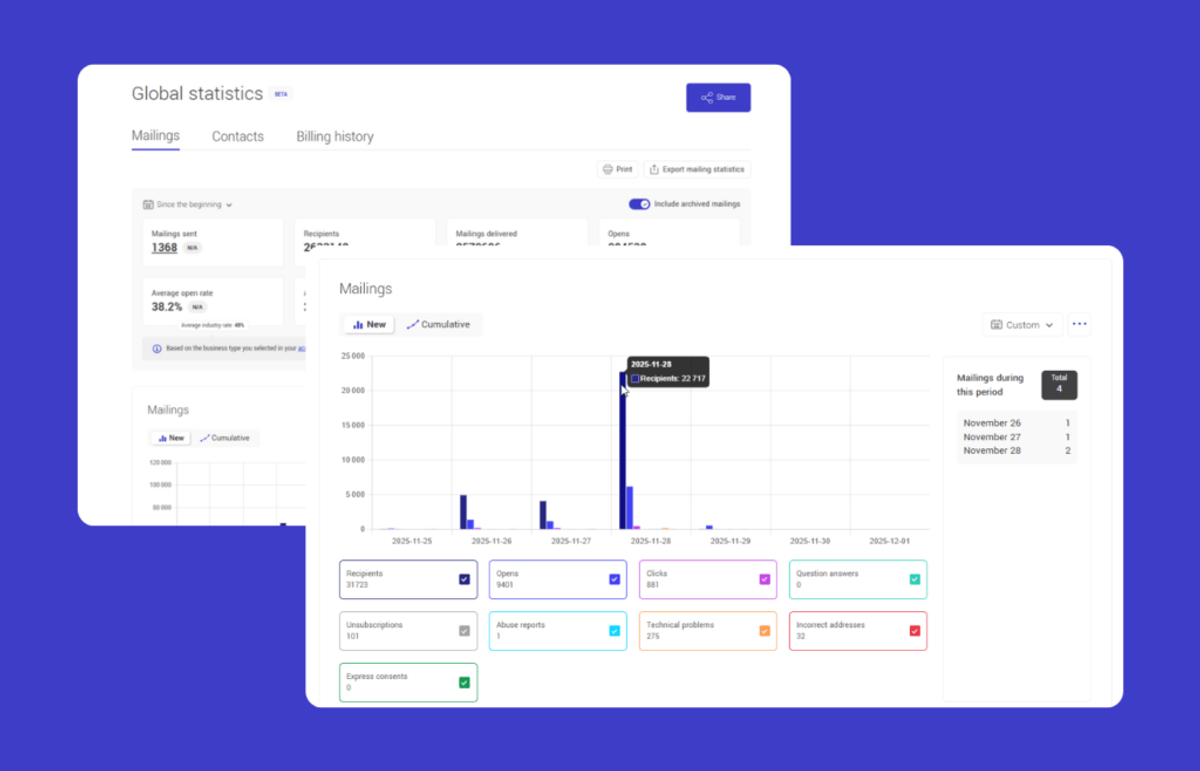
Cyberimpact’s analytics are designed to be actionable without being overwhelming — a common complaint with platforms that surface dozens of metrics without helping you understand which ones matter.
After each send, you get a clear summary of opens, clicks, bounces, and unsubscribes. Performance is presented in a way that makes it easy to assess results without needing to be a data analyst.
Every link in your campaigns is tracked, so you can see not just whether people clicked, but what they clicked on. You can look at individual campaign performance or zoom out to see how your list and sending schedule are trending over time.
Cyberimpact also tracks unsubscribes and consent automatically, so your reporting reflects not just engagement data but also the compliance picture — who has opted in, when they did, their consent expiration dates, and whether it’s time to convert implied consent into express consent.
For organizations that want the right data to make better decisions — without needing a dedicated analytics team to interpret it — Cyberimpact’s reporting tools are built to fit that reality.
Common Mistakes When Tracking Email Metrics
Fixating on open rates. Open rate is the most visible metric and the least reliable indicator of actual success. Use it as a directional signal, not a primary KPI. If someone opened your email but did nothing else, the open didn’t move your goal forward.
Ignoring conversions. Many email marketers track engagement metrics but never connect them to business outcomes. If you can’t measure whether email is driving revenue, registrations, or other meaningful actions, you’re missing the most important part of the picture.
Not segmenting your results. Reporting on aggregate performance treats your entire list as a homogeneous group. Segment-level data reveals which audiences you’re resonating with and which you’re not — and that’s where optimization opportunities live.
Tracking data without taking action. It’s easy to pull reports, review the numbers, and move on to the next campaign without changing anything. Metrics are only useful if they inform decisions. Build a habit of noting one thing to test or improve after every campaign review.
Cleaning your list only when performance drops. By the time your metrics are suffering from list decay, the damage is already affecting your sender reputation. Regular list hygiene — removing hard bounces immediately and re-engaging or removing dormant contacts periodically — is a proactive practice, not a reactive one.
Conclusion
Email marketing metrics are the feedback loop that makes improvement possible. Without them, you’re sending based on instinct. With them, every campaign is an opportunity to learn something that makes the next one better.
The goal isn’t to track everything — it’s to track the right things, interpret them honestly, and act on what they tell you. Start with the metrics that connect most directly to your business objectives. Build a reporting rhythm that keeps those numbers visible. Test one variable at a time, and let the data guide what you double down on.
If your current platform makes it hard to find or understand your metrics, that’s a problem worth solving. The easier it is to see your data, the more consistently you’ll use it.
What are email marketing metrics?
Email marketing metrics are data points that measure how your email campaigns are performing — including how many people opened your emails, clicked on links, converted, unsubscribed, or marked your message as spam. They help you evaluate the effectiveness of your campaigns and identify where to improve.
What are the most important email marketing metrics?
The most important metrics depend on your goal. For engagement, focus on open rate and click-through rate. For business outcomes, track conversion rate and revenue per email. For list health, monitor bounce rate, unsubscribe rate, and spam complaint rate. Click-to-open rate (CTOR) is also valuable for evaluating content quality independently of your subject line.
What’s a good open rate for email marketing?
Open rates vary by industry and audience quality. According to Cyberimpact’s State of Email Marketing in Canada 2026 report, the Canadian average open rate in 2025 was 44.43% — though this figure is influenced by Apple’s Mail Privacy Protection, which inflates opens for a portion of users. Use open rate as a directional signal rather than an absolute measure, and focus on whether your own numbers are improving over time.
What’s the difference between CTR and CTOR?
CTR (click-through rate) measures clicks as a percentage of all emails delivered. CTOR (click-to-open rate) measures clicks as a percentage of emails that were opened. CTOR isolates your content quality — it tells you how well your email performed for the people who actually read it.
What is a good email bounce rate?
Hard bounces (permanent delivery failures) should be removed from your list immediately — Cyberimpact does this automatically. If your bounce rate is consistently high, it usually points to a list quality issue: old addresses, unverified contacts, or poor acquisition practices. The Canadian average hard bounce rate in 2025 was 0.27%, according to the State of Email Marketing in Canada 2026.
How do I measure email marketing ROI?
To measure email ROI, you need to track revenue attributed to email (through conversion tracking or UTM parameters on links) and compare it to the cost of your email program. Revenue per email is a useful simplified metric. The specific method depends on your business model — direct ecommerce revenue is easier to attribute than B2B relationship building.
How often should I report on email marketing performance?
A monthly report works well for most organizations. It gives you enough data to identify trends without getting lost in day-to-day fluctuations. If you send frequently, a brief weekly summary alongside a deeper monthly review balances operational awareness with strategic perspective.
What are email marketing KPIs?
Email marketing KPIs (Key Performance Indicators) are the specific metrics you’ve selected to measure progress toward your goals. The difference between a metric and a KPI is intent: a metric is any measurable data point; a KPI is a metric you’ve decided to track because it directly reflects success for your program. Examples include open rate, conversion rate, or list growth rate — depending on what matters most to your organization.
Does Cyberimpact provide email analytics?
Yes. Cyberimpact includes built-in reporting for all campaigns, covering open rates, click rates, bounces, unsubscribes, and link-level tracking. Reports are designed to be readable and actionable, and the platform tracks consent data alongside engagement metrics to support CASL compliance.