Your HTML emails can be displayed on countless services, software and platforms. Screen resolution, the interface (toolbars, etc.) and the user resizing their window are all factors that can limit how your email is displayed.
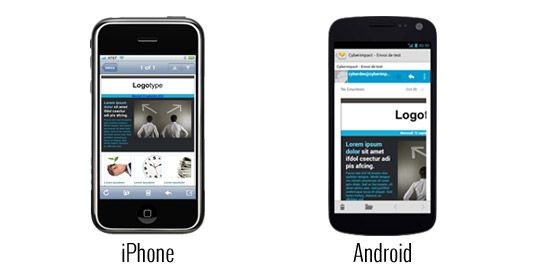
Example 1: smartphones
While an iPhone will resize an email so it fits entirely on the screen, an Android phone will only show the top left corner if the email is too wide.
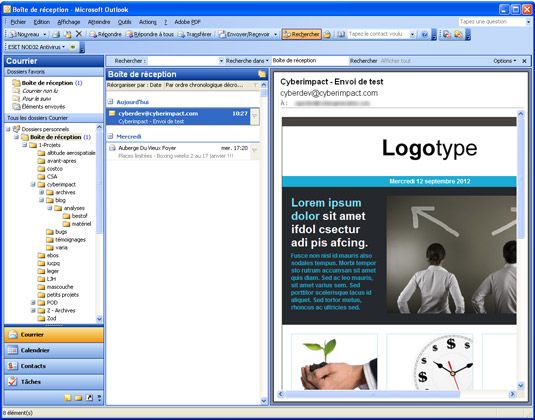
Example 2: a reading pane that’s too small
If the screen resolution is tight (e.g., 1024x768) or the user has manually resized the window, the software may not have enough room to display everything. In that case, it will cut off the email and display scroll bars.
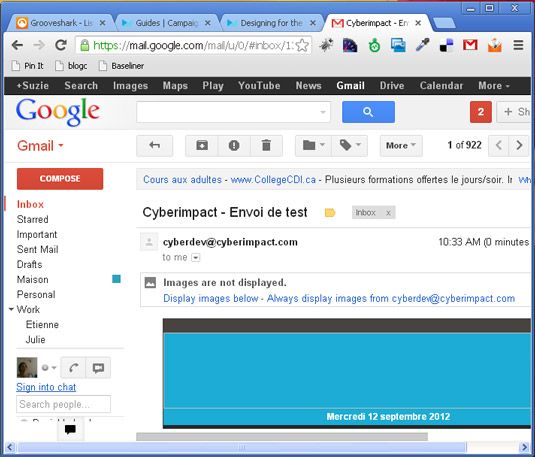
Even worse: images may not be displayed by default, leaving big empty blocks!
Conclusion
There’s no way to be absolutely certain your email will display in full. Design your layout for a maximum width of 600 pixels and think about what will be visible if the display is cut off. If your logo is in the top left corner, make sure to provide alt text in case images are turned off by default. A tip: use Cyberimpact’s template builder or pre-designed templates! They are specifically set up so their width never exceeds 600 pixels, and they automatically resize your images when needed. They’re also now mobile-friendly.